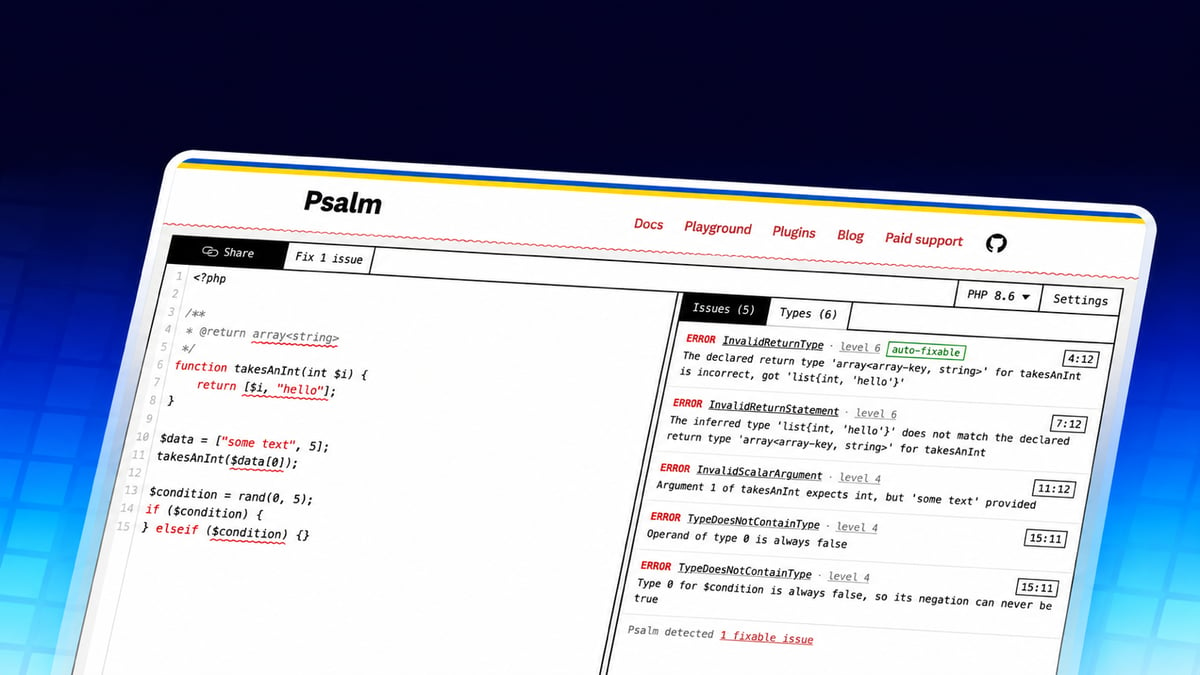
The Psalm team just merged a redesign of the Psalm playground, the browser version of the PHP static analysis tool. It adds a Types tab that lists the types Psalm inferred, an error level setting from 1 to 8, and a diff preview before Psalm applies a fix to your code. The changes landed on November 8 in pull request #143.
The playground runs Psalm on whatever you paste into it, so you can try the analysis without installing anything or writing a psalm.xml. The PHP version picker covers PHP 7.4 through 8.6 and defaults to the newest version. That makes it a quick way to try Psalm 7, which shipped on November 2 with support for the PHP 8.5 pipe operator and PHP 8.6 partial function application.
Checking Types in the Playground
Here is the pipe example from the Psalm 7 release. It uses a PHP 8.5 pipe and a PHP 8.6 partial application (explode(' ', ?)), so set the picker to PHP 8.6:
<?php

function lowercaseWords(string $title): string {
    return $title |> explode(' ', ?) |> strtolower(...);
}
Psalm reports an InvalidArgument on the last stage. The error alone doesn't tell you much if you expected each word to get lowercased.
The Types tab sits next to the Issues tab and lists the types Psalm inferred. Hovering a row highlights the code it belongs to. Use it to check what the pipe passes along: explode() returns a list of strings, and strtolower() expects a single string [verify: exact rows the Types tab shows for each pipe stage]. To lowercase each word, map over the list with array_map() instead of handing the whole list to strtolower().
The Issues tab got updates too. Taint traces from security analysis now show as numbered steps, and hovering a step highlights its code.
Error Levels 1 to 8
The playground always ran at error level 2, Psalm's default when psalm.xml doesn't set one. Settings now let you pick a level from 1 (strictest) to 8, with 2 as the default.
- Each issue shows the error level it belongs to, with a link to the error levels docs.
- Shared snippets save the level, and URLs accept it as
?level=. - Links to snippets at the default level are unchanged.
The pull request lists one known gap: at level 1, the playground still shows MixedAssignment and a few other Mixed issues as info instead of errors.
Fix Previews
Psalm can fix some issues on its own. In the playground, issues it can fix get an "auto-fixable" label. The "Fix N issues" button now opens Psalm's fix as a diff, and you choose Apply or Cancel. After you apply it, the toolbar switches between the original code and the fixed code so you can compare the two.
Editor Changes
The editor and the output now sit side by side, with a split you can drag. Some of the other changes include:
- Ctrl/Cmd+click jumps to a definition, and built-in functions link to php.net
- Signature help while you type a function call
- Auto-closing brackets and quotes
- Line links such as
#L5-L12that highlight a range - Shortcuts: Ctrl/Cmd+Enter runs the analysis, Ctrl/Cmd+S shares, and F8 and Shift+F8 step through issues
- Share copies the link and keeps you on the page
Issue markers also no longer shift after non-ASCII text, because the playground now converts Psalm's byte offsets to character offsets.
Try It
The full-page playground lives at psalm.dev/play. The old /playground, /demo, /try, and /sandbox URLs redirect there, and existing /r/ snippet links keep working. See pull request #143 for the complete list of changes, and paste in some code to give it a try.